English
Your Back Office is getting a new look
Sunday, February 15th, 2026



A simpler, faster experience is here.

Running your Norwex business is about to feel easier than ever. We’ve enhanced your Back Office and Norwex Consultant App experience to help you find what you need faster, take action more easily and work seamlessly across devices. The refreshed design puts your most important tools front and center, creating a smoother, more intuitive experience that fits the way you already work.
Watch this video to hear Chief Technology Officer Jose Martinez talk with members of our beta group and Information Technology Advisory Council (ITAC) about their experience. They share their honest first reactions to the new Back Office experience and why, after testing it, they ended up loving the improvements.
When does the new experience launch?
The new experience goes live at 9 am CT tomorrow, February 16. You’ll see an in-app welcome message when you log in to the Back Office and your Norwex Consultant App.
This update follows two months of testing with members of the Information Technology Advisory Council (ITAC) and other early-access Consultants, who have been using the new design since November. Their feedback helped refine navigation, clarify actions and confirm that these updates make running your business easier.
What’s new?
There’s a lot to explore – and every change was made with input from Consultants who use the Back Office every day.
A new navigation that works the way you do
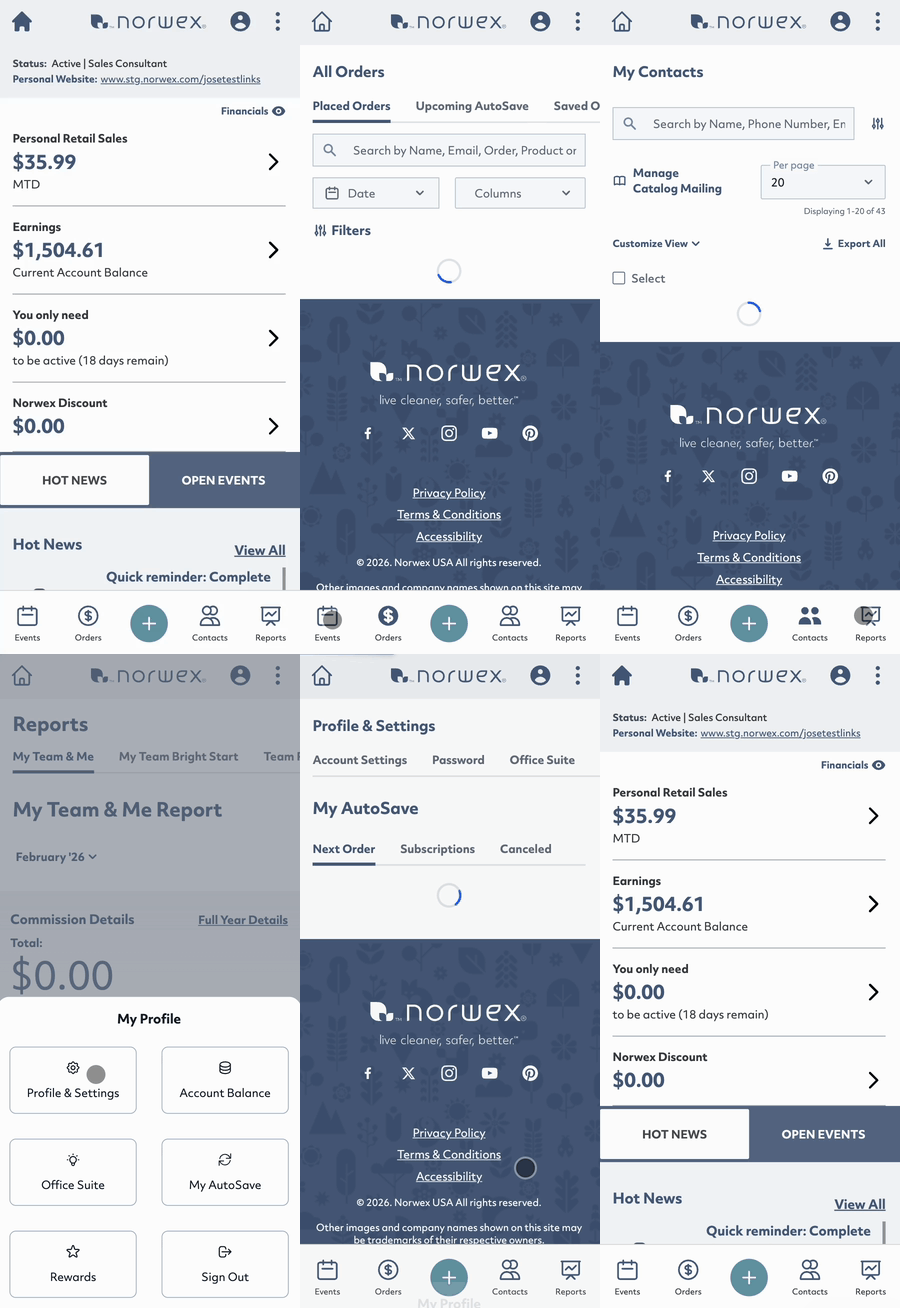
On your mobile device, the hamburger menu (three horizontal lines) has been replaced with a bottom navigation bar featuring your most-used tools: Events, Orders, Contacts and Reports.
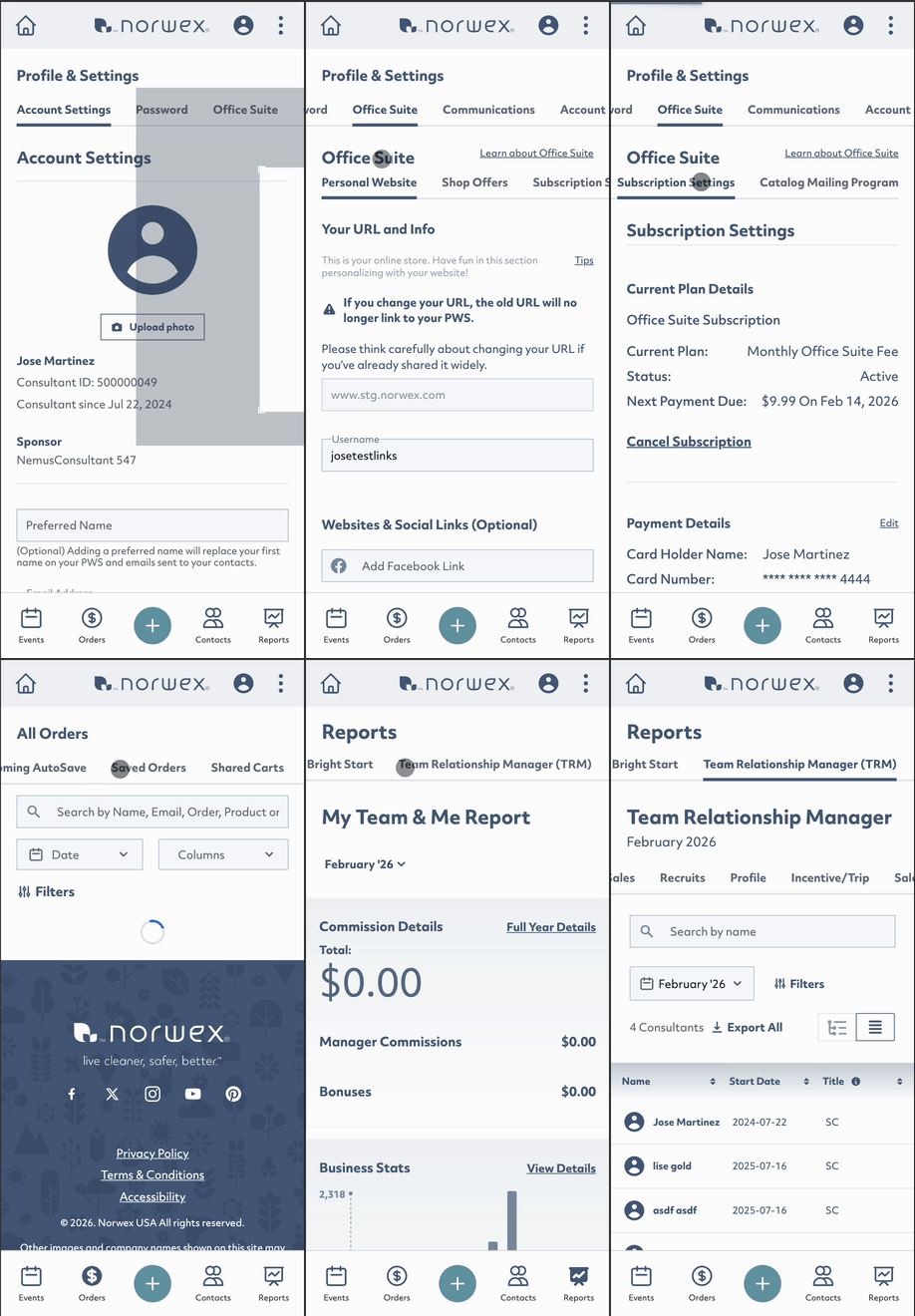
Submenus now scroll horizontally, making it easier to move between tabs on mobile without extra clicks.
Faster “create” actions

A new “+” button brings all “create” options – Event, Order and Contact – into one place. You can now start something new from anywhere in your Back Office.
Cleaner, smarter details

When you click or tap on a row, the details now open in a simple pop-up window instead of navigating away from the page. You’ll see new tabs like Summary, Info, Orders, Events, Perks and AutoSave – all organized around how you manage your business.
What else?
The same design updates are also in the Norwex Consultant App, giving you a consistent experience whether you’re on desktop, tablet or phone. Navigation, styling and layouts now match across both platforms, so it’s easier than ever to move between them without missing a beat.
Why it’s changing
Because the way Consultants work has changed.
More than 60% of Back Office activity now happens on mobile phones, yet the previous design was not built for these smaller screens. Feedback and usage data showed that Consultants were spending too much time clicking, searching and trying to find the right information.
The new experience was built to solve those challenges, whether you prefer mobile or desktop. It’s designed to:
• Reduce the number of clicks needed to complete common tasks
• Make navigation consistent across all devices
• Help you find key information faster and stay focused on your business
By combining user feedback with analytics and modern user experience best practices, this release represents a major step forward in making the Back Office easier and more enjoyable to use.
What’s next
This is the first phase in an ongoing effort to make the Back Office and Norwex Consultant App work smarter for you. Additional refinements will continue throughout 2026 based on real Consultant feedback and continued usability testing.
The new design is here – simpler, faster and built for the way you run your business today
If you haven’t already, download the Norwex Consultant App today.


And to fully leverage your Back Office as a powerful business-building tool, make sure you’re subscribed to Office Suite.

View all the content from this month’s Norwex News here.